For iPhone, iPad and Mac

A conversation people
stop scrolling to read.

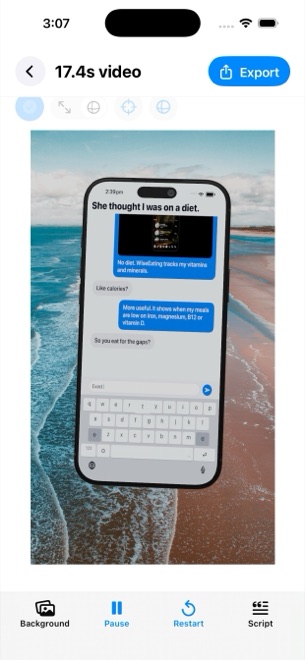
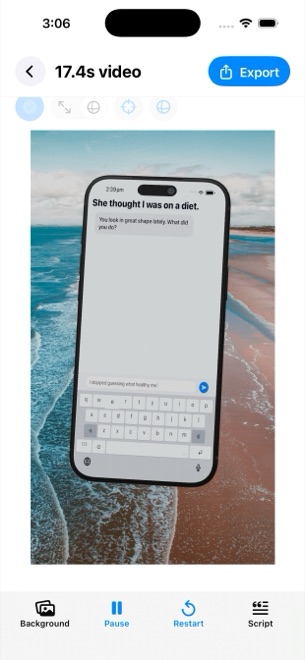
Write the messages. Glance Studio types them out on a 3D phone, one bubble at a time, with the pauses, the read receipts, the photo that drops into the chat, the push notification that interrupts, the camera that leans in on the line that matters. Then it renders a vertical video ready for the feed.

Free on iOS, with ads. One purchase on Mac. · iOS 26 · iPadOS 26 · macOS

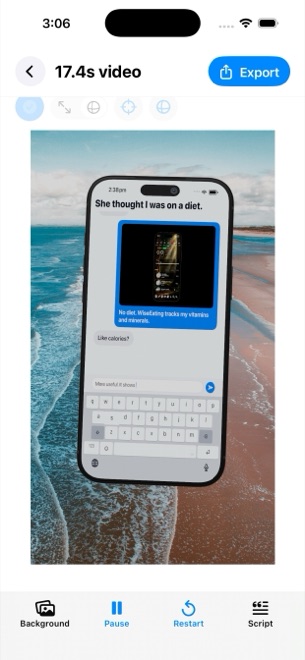
Glance Studio on iPhone: the live 3D stage with a phone showing an animated chat, and the editor footer.
  • Four chat looks, typed out bubble by bubble
  • A 3D phone with materials, lighting and camera motion
  • Photos and video inside the messages, fullscreen when it counts
  • Hook, call to action, push notification, music
  • On-device AI voiceover with fifteen voices
  • 1080×1920 at 30 fps, HEVC, no watermark

What it does

Script, stage, export.

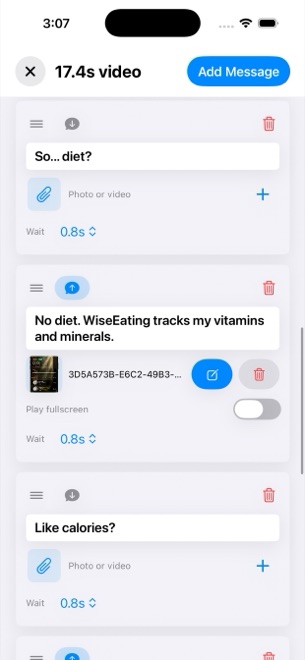
The editor is one screen: the stage on top, the script and its settings below. Everything renders on the device, and the export is a plain MP4.

Write the chat like a script

Write the chat like a script

Messages from either side, each with its author, avatar and colour, a delay before it appears, a delivery state that moves from sent to received to viewed, and a room-entry line for when someone joins. Typing is simulated on a keyboard at a speed you set in letters per minute, with the text area in focus, so the viewer watches the message being written.

  • Sender and receiver, up to five contributors
  • Delays, delivery states, room entries
  • Keyboard typing at your speed
  • Four chat looks: classic blue, channel dark, purple, green
A phone that is actually 3D

A phone that is actually 3D

The conversation plays on a rendered iPhone you can move and rotate on the stage, in five finishes from cosmic orange to deep blue. Camera distance, field of view, pitch, yaw and roll are yours, and a message can carry a focus keyframe: zoom, zoom with blur or dim, spotlight, pulse, shake or bounce, on its own or across a group of messages. A flat mode drops the phone and keeps the chat.

  • One rendered iPhone, five finishes
  • Camera distance, angle and motion intensity
  • Seven focus animations per message
  • Flat overlay mode without the device
Media inside the conversation

Media inside the conversation

A message can carry a photo or a trimmed video with its own volume, and expand it fullscreen for as long as you say. The stage background is a colour, an image or a video; the phone screen can play real footage instead of the chat. Media changes fire at a second, after a message, or after the previous one ends.

  • Image and video attachments with trim and volume
  • Fullscreen expansion with a duration
  • Background image or video, phone-screen footage
  • Timed media changes, up to thirty per project
Hook, notification, call to action, music

Hook, notification, call to action, music

An opening hook overlay for the first seconds or the whole video, a push notification banner with title and subtitle, a call to action after a delay you choose, and a music track trimmed to fit. Message sounds from four tones or none. Text sizes for hook, messages and call to action are set separately, from 10 to 64 points.

  • Opening hook and call to action overlays
  • Push notification with title and subtitle
  • Music with trim and volume, four message tones
  • Independent text sizes
A voiceover that never leaves the device

A voiceover that never leaves the device

Maya1, an open voice model, runs inside the app: pick one of fifteen voices from podcast host to dark villain, or describe your own, and each message can speak with a start delay and a volume. The model weights download once from Hugging Face; the audio is generated on your device.

  • Fifteen voice presets, plus your own
  • Per-message delay and volume
  • Weights downloaded once, generation on the device
Export that is ready to post

Export that is ready to post

Every render is 1080 by 1920 at 30 frames per second, HEVC where the device supports it and H.264 otherwise, saved to Photos on iOS or to a file on Mac. No watermark, no export cap. The Mac app keeps a history of the videos rendered for each project.

  • 1080×1920, 30 fps, 9:16
  • HEVC or H.264 in MP4
  • No watermark
  • Render history on Mac

Who it is for

For anyone whose story is a conversation.

Short-form creators
The chat format holds attention because the viewer waits for the next bubble. Write the twist, set the delay, let the typing do the suspense.
App and product marketers
A support chat that ends in the feature. A friend recommending the app. The push notification that shows the outcome. All staged, all yours.
Agencies and UGC teams
One project per concept, five contributors, media swapped mid-video, and a render that drops straight into the client's feed.
Not for
Passing off staged chats as real ones. The looks are stylised and unbranded, and the terms ask you to keep it honest.

What it costs

Free on iPhone and iPad. One purchase on Mac.

The iOS app is free with every feature; it shows an ad when it opens and plays a rewarded video before each export. Glance Studio Desktop for Mac is a single purchase on the Mac App Store with no ads, no rewarded videos and no in-app purchases. The editor and the export are the same on both.

iOS

$0 free, with ads

  • Every editor feature
  • 3D stage and flat mode
  • Media, hook, notification, music
  • On-device voiceover
  • 1080×1920 export, no watermark
  • Saves to Photos

An ad on opening; a rewarded video before each export.

Mac

$4.99 one time

  • Every editor feature
  • No ads, no rewarded videos
  • Export to a file of your choice
  • Render history per project
  • Big-screen editing

Glance Studio Desktop on the Mac App Store. No ads, no in-app purchases.

Nothing is locked on either platform. The difference is the ads: iOS pays for itself with them, the Mac app with its price.

Pricing →

Questions

Asked often enough to write down.

Are the chat looks real apps?

No. They are four stylised layouts, classic blue, channel dark, purple and green, that read as familiar without copying anyone. Glance Studio is not affiliated with or endorsed by Apple, Meta, Discord, Rakuten or any messaging service.

Is there a watermark or an export limit?

No watermark and no cap on exports. On iOS, each export is preceded by a rewarded video; on Mac, it is not.

What are the limits of a project?

Thirty messages, thirty media changes and five contributors per project. Longer stories are two projects and a cut.

Does the voiceover use the cloud?

No. The Maya1 model runs inside the app. The weights are downloaded once from Hugging Face, and every line is generated on your device.

Which devices can it render?

One: a current-generation iPhone model, in five finishes, plus a flat mode with no device at all. iPad and laptop stages are not in this version.

Where are my projects?

On the device, saved automatically. There is no account and no sync between iPhone and Mac; export the video and move that.

Can I use it for ads?

Yes, and the terms ask two things: use only media you have the rights to, and do not present a staged conversation as a real one or make claims the product cannot back.

Write the chat. Render the video.

Free on the App Store for iPhone and iPad; one purchase on the Mac App Store. The first render is a few minutes away.

Download on theApp Store